Serdashop
picovox
picovox
In stock
Couldn't load pickup availability
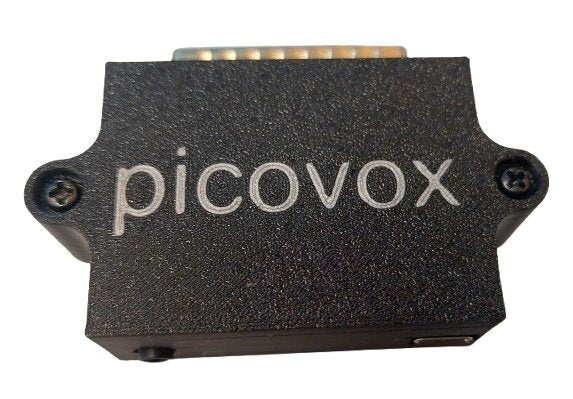
picovox available now !!
picovox is a sound card for parallel port, that can emulate several sound devices :
- Covox
- Stereo-On-1
- FTL Sound Adapter
- Disney Sound Source
- OPL2LPT
- OPL3LPT
- TNDLPT
- CMSLPT
The picovox project is designed by Jan Samek.
This serdaco version of the PCB is developed in special agreement with Jan Samek.
picovox PCB specs :
- dimensions : 54mm x 47mm
- parallel port connector
- USB-C power connector
- 3.5mm stereo line out
- optional 3d printed high quality enclosure
For up to date information, check out the pivocox open source project here
You can select the emulated device using pcvx.com
Demo by Retro Erik:
How do I use it?
You just need to plug your picovox into any LPT port of your computer, plug in the power to the USB-C connector and your favorite pair of speakers into the audio jack. In case of Covox/FTL/DSS/Stereo-On-1 you can use them right out of the box. In case of OPL2LPT, TNDLPT and CMSLPT, you can use them in the same way as the listed devices; either with games with native support, or load their drivers/patches. You can switch between modes via a tool for DOS called pcvx.com :
How to use PCVX.COM ?
You have to copy the pcvx.com file to your DOS computer.
You can download the latest version from RELEASES.
The usage is as follows:
PCVX [PORT] MODE [DEVICE]PORT
You may specify the port by using LPT1, LPT2, or LPT3, depending on where your picovox is connected. If your picovox is connected to an LPT port at a non-standard address, you can use ADDR0x378 where you replace 0x378 with your base address (where data pins are set). The status register is base + 1, and the control register is base + 2.
MODE
| Option | Device | Description |
|---|---|---|
| INIT | ❌ | Initializes the port for picovox use. |
| STATUS | ❌ | Prints the status of the picovox device. |
| SET | ✅ | Sets picovox to the specified emulated device. |
| HELP | ❌ | Prints available commands with descriptions and use examples. |
| LIST | ❌ | Prints all the supported devices you can use in DEVICE. |
DEVICE
Mandatory argument for SET. Specifies the emulated device.
| Option | Description |
|---|---|
| COVOX | Covox Speech Thing/Intersound MDO/Generic 8-bit DAC |
| OPL2 | OPL2LPT, Adlib compatibility with ADLiPT/adpatch |
| OPL3 | OPL3LPT, Adlib/SoundBlaster compatibility with ADLiPT/adpatch |
| CMS | CMSLPT, GameBlaster compatibility with CMSLPT |
| TND | TNDLPT, Tandy/PCjr compatibility with TNDLPT |
| DSS | The Disney Sound Source |
| STEREO | Stereo-on-1 by Mark J. Cox. |
| FTL | FTL Sound Adapter supported by Dungeon Master. |
| SID | SIDLPT, Innovation SSI-2001 support with patches. Not implemented yet |
| MP3 | MP3 decoder using specialized program. Not implemented yet |
Example usage
PCVX LPT1 SET COVOX – Sets picovox on LPT1 to Covox mode.
PCVX ADDR0x3E8 INIT – Initializes picovox on address 0x3E8.
PCVX STATUS – Shows current status of picovox.
PCVX HELP – Prints help.
Manufacturer & Safety Information
Manufacturer & Safety Information
Serdaco BV (trading as Serdashop)
Abdijlaan 37, BE-8460 Oudenburg, Belgium
centraldesk@serdaco.com
VAT BE 0837.512.945
Serdaco BV is the manufacturer of its own products, and the EU importer for items made by others.
Product identification — the product name and variant shown on this page. Type and revision are marked on the product or its packaging.
Safety information
- Bare circuit boards are static-sensitive. Handle by the edges, with anti-static precautions.
- Switch off and unplug the host device before installing.
- Use within the ratings marked on the product. Don't use damaged cables or adapters; mains adapters are for indoor use only.
- Contains small parts. Keep out of reach of children.
- At end of life, hand in electrical equipment at a local collection point (WEEE) rather than with household waste.