Serdashop
SerdaVision HDMI (pre-order)
SerdaVision HDMI (pre-order)
Couldn't load pickup availability
Pre-order - ships in 2-3 weeks.
The firmware can be updated over USB-C at any time.
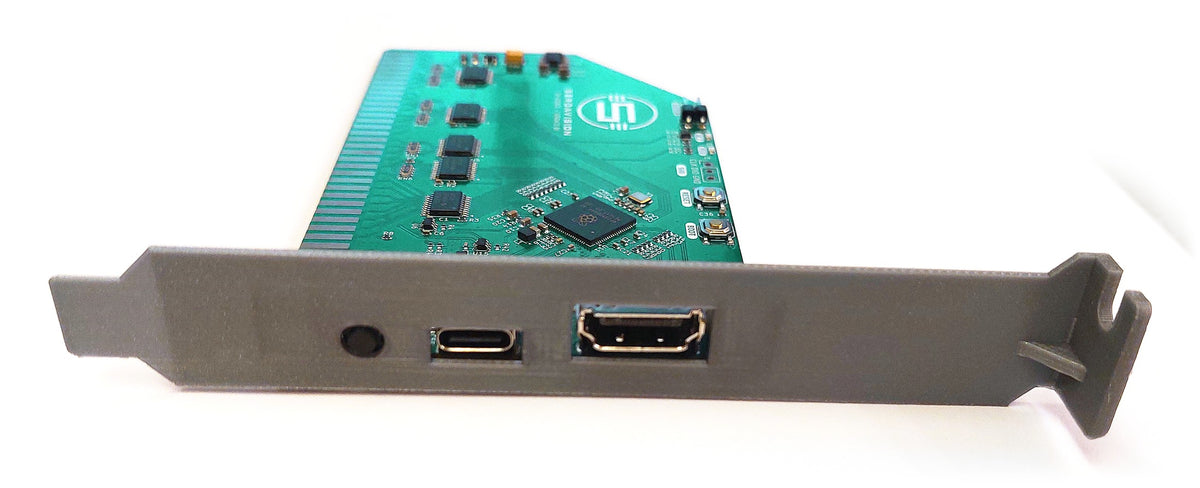
An 8-bit ISA video card for IBM PC compatibles, from the 5150/XT to Pentium-class machines. A Raspberry Pi RP2350 functions as the video chip: it emulates the original hardware in firmware and outputs HDMI. One firmware file supports thirteen video standards; the card runs as one at a time, selected from DOS or with an on-screen menu.
Video standards supported :
- VGA
- EGA (256 KB)
- CGA, Hercules, MDA
- VGA-XT and EGA-XT for 8088/V20 machines
- SVGA: VGA + VESA 1.2, up to 800x600x16 and 640x480x256, 320x200 hi-colour, optional ET4000 mode
- Experimental: Plantronics ColorPlus, Olivetti PC1 (V6355D), Tandy 1000/PCjr, Hercules InColor
Specifications
- Bus: ISA 8-bit, fits 8- and 16-bit slots, 4.77-8.33 MHz (12 MHz reported working)
- Screen memory: up to 1.9 MB/s write and 1.5 MB/s read with zero-wait-state (0WS) on supporting chipsets such as the Intel 430HX; up to 1.1 MB/s without
- Video memory: 256 KB, 320 KB with the VESA modes
- Output: HDMI or DVI, 640x480 at 60/70 Hz, 800x600 at 56 Hz; analog VGA via a powered HDMI2VGA dongle
- Settings, kept in flash: scanlines, phosphor colour, aspect, refresh, composite colour model (CGA)
- Power from the slot or USB-C; firmware updates over USB-C
On-screen menu
Press the menu button on the bracket and the card draws its own menu over the picture - in a game, in the BIOS setup, or when the PC shows nothing because it is set up for another card. Short presses move through the menu, a one-second hold chooses. From the menu you switch the personality and set scanlines, monitor colour (colour, white, green, amber), refresh rate, composite colour, vertical fill, BIOS in RAM and XT/AT bus, or go back to the factory settings. Holding the button for five seconds always brings the card back to VGA with factory settings.
DOS tools (included)
- SVSET - switches the personality and changes every setting from the DOS prompt or a batch file (for example SVSET /M:CGA), and saves them to flash
- SVKEY - a small resident program (752 bytes): Ctrl+Alt hotkeys change scanlines, phosphor, refresh, vertical fill and composite colour while a game runs
- SVTEST - self-test of video memory and registers, with read and write speed figures
- SVMODES - draws and checks every screen mode of every personality and writes a report
- RASTER - measures the picture timing
- HICOL - shows the VESA hi-colour modes
- ZWSLOAD - measures the bus speed
Limitations
8-bit only; VGA/EGA text is 8 dots wide; mid-frame palette changes are not shown; no light pen.
Doom with scanlines, and on screen menu :

Manufacturer & Safety Information
Manufacturer & Safety Information
Serdaco BV (trading as Serdashop)
Abdijlaan 37, BE-8460 Oudenburg, Belgium
centraldesk@serdaco.com
VAT BE 0837.512.945
Serdaco BV is the manufacturer of its own products, and the EU importer for items made by others.
Product identification — the product name and variant shown on this page. Type and revision are marked on the product or its packaging.
Safety information
- Bare circuit boards are static-sensitive. Handle by the edges, with anti-static precautions.
- Switch off and unplug the host device before installing.
- Use within the ratings marked on the product. Don't use damaged cables or adapters; mains adapters are for indoor use only.
- Contains small parts. Keep out of reach of children.
- At end of life, hand in electrical equipment at a local collection point (WEEE) rather than with household waste.